Templates for record comments

This feature added in April 2023 allows verifiers to save one or many templates containing text, e.g. to  provide a ‘signature’ that contains the verifier name and a link to their recording scheme; or a frequently used comment about a species, etc. Once saved the templates can be re-used whenever needed. 

You don’t have to use the templates at all! You can just add your comment in the usual way. The templates provide extra options for quickly calling up comment text that you have previously saved, and there are two different uses:

Photo verification page

This new page is designed to make it easier for verifiers to review records that have photos  attached. Photo records will still be shown on the main verification page as well, so verifiers  can choose whether to do all their verification on the current page, or try the new one for  the records with photos.

Downloading Records

As a verifier you are able to download the record details for all the records that you are able to verify. Currently this is done by going to the Explore menu and choosing Download. Then, in the “Download type”, select your verification role:

Establishing a routine

The various options for filtering and for verifying multiple records offer many ways in which verification can be organised. It’s worth spending some time thinking about what works best for your purposes. If your scheme receives records at a relatively slow pace you may well be able to verify each one individually as they arrive. But schemes that have larger amounts of data arriving may need a different approach.

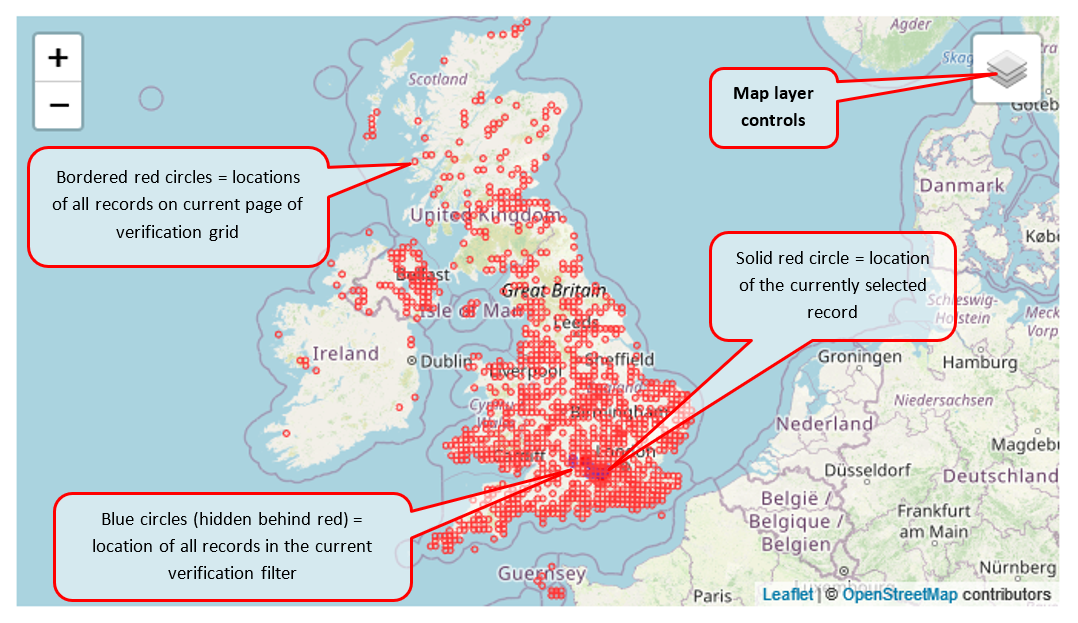
Map pane

The map is provided to give some context to the record and allow you to check whether the location seems to be correctly recorded. There are some map settings that allow you control the layers that appear on the map; the default view shows:

If you put your mouse over the “Map layer controls” box it will open up and show you some tick-box options: